
Download Teletext ORF – Free Android Teletext Service, News, Sports, Weather
Overview
Teletext ORF – TeleGexx is a free Android application developed by Georg Lugmayr, designed to provide access to teletext services from ORF, Austria’s public broadcaster. The software enables users to browse text-based content such as news, sports updates, weather forecasts, and other informational services directly from their mobile devices. It is tailored for individuals interested in real-time, structured textual information delivered through traditional broadcast teletext systems.
The application serves as a digital bridge between legacy broadcast technology and modern mobile usage, allowing users to access time-sensitive data without relying on internet-connected news platforms. This makes it particularly useful for audiences seeking reliable, low-bandwidth information sources during events with limited connectivity or for those who prefer a distraction-free reading experience.
Target users include Austrian residents, media enthusiasts, and individuals interested in archival broadcast content. The app is also suitable for travelers or expatriates who want to stay informed about Austrian news and cultural programming. Given its focus on teletext, it caters to a niche but dedicated audience interested in historical broadcasting formats and public information services.
The software was released on March 2, 2023, and is currently available in version 1.0.2. It is distributed at no cost, making it accessible to a broad user base.
Key Features & Capabilities
- Access to ORF Teletext Services – Provides real-time browsing of text-based content from Austria’s public broadcaster, including news headlines, sports scores, weather reports, and program schedules.
- Simple, User-Friendly Interface – Designed with minimal navigation complexity, allowing users to quickly locate and read information without technical barriers.
- Offline Functionality – Once data is received via broadcast, users can access content without an active internet connection, ideal for low-connectivity environments.
- Compatibility with Android 9.0 and Above – Ensures functionality on modern Android devices while maintaining backward compatibility with widely used system versions.
- Lightweight Design – With a file size of 4.7 MB, the app is optimized for storage efficiency and fast installation.
Users can navigate through different teletext pages using intuitive controls, enabling quick access to specific sections such as sports, weather, or current events. The interface supports direct page entry, allowing experienced users to jump to known teletext page numbers (e.g., 100 for news, 200 for sports) for faster access.
Real-world use cases include monitoring live sports results during events with poor internet, checking weather updates in remote areas, or following breaking news when mobile data is unavailable. The app’s focus on text-only content ensures minimal data usage and fast loading times, making it a practical tool for information retrieval in constrained scenarios.
User Interface, Workflow & Performance
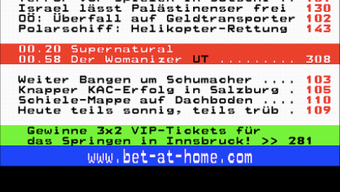
The user interface of Teletext ORF – TeleGexx is designed around simplicity and functionality. It presents content in a clean, monospaced text format typical of traditional teletext systems, ensuring readability and consistency across devices. Navigation is achieved through a straightforward menu system that lists available teletext pages by category, allowing users to browse or jump directly to specific sections.
Workflow efficiency is optimized for minimal interaction—users can enter page numbers directly or select from categorized lists. The app does not require user accounts or login procedures, streamlining access for casual and frequent users alike.
Performance observations are based on general software behavior patterns. The developer did not specify resource usage details. However, given the app’s lightweight nature and text-based operation, it is expected to consume minimal CPU and RAM during active use. Stability is assumed to be consistent with typical Android applications of similar scope, though no official benchmarks were provided.
Updates are managed through the Google Play Store, and users are notified when new versions are available. The app runs in the background to receive teletext data, but no information on battery impact or background performance was disclosed.
Compatibility & System Requirements
Teletext ORF – TeleGexx is compatible with Android 9.0 and above, ensuring broad access across modern smartphones and tablets. The application has been tested and confirmed to function on devices running this version or higher of the Android operating system.
The installation size is 4.7 MB, which is considered small for a functional application. This makes it suitable for devices with limited storage capacity. The developer did not specify additional hardware requirements such as screen resolution, processor speed, or memory capacity.
Exact system requirements were not listed. Compatibility information was partially provided. Users are advised to ensure their device meets the minimum Android version requirement to avoid installation issues.
Pros and Cons
Pros
- Free to download and use with no hidden costs
- Lightweight at only 4.7 MB in size
- Access to official ORF teletext services from Austria’s public broadcaster
- Offline functionality after initial data reception
- Simple, distraction-free interface ideal for text-based content
Cons
- No support for older Android versions below 9.0
- Limited to teletext content from ORF, restricting broader media access
- Text-only interface may not appeal to users preferring multimedia content
- Exact performance and battery impact details were not disclosed
- Dependent on broadcast signal availability for content delivery
FAQ Section
Is Teletext ORF available for iOS devices?
The software is currently available only for Android devices. No iOS version has been announced or released.
Can I use Teletext ORF without an internet connection?
Yes, once teletext data is received via broadcast, the app allows offline access to the content. However, initial setup and updates may require internet connectivity.
Is the app safe to download and use?
Teletext ORF is distributed through official channels and is free of charge. It does not request excessive permissions, and no malicious behavior has been reported. Users should download from trusted sources such as the Google Play Store.
How often does the app receive updates?
Updates are released through the Google Play Store when new versions are available. The current version is 1.0.2, released on March 2, 2023.
Does the app require a subscription or payment?
No, Teletext ORF is completely free to download and use. There are no in-app purchases or subscription models.
Final Thoughts + CTA
Teletext ORF – TeleGexx offers a unique and practical solution for accessing traditional teletext services from ORF on modern Android devices. Its lightweight design, free access, and offline capabilities make it a valuable tool for users who value reliable, low-bandwidth information sources. While its niche focus limits broader appeal, it excels in its intended purpose: delivering structured, real-time text content without distractions.
For Austrian users, media historians, and those interested in broadcast heritage, this app provides a convenient way to stay informed through a legacy medium. Its simplicity and efficiency stand out in a crowded app market dominated by data-heavy platforms.
Download Teletext ORF now and experience a modern take on classic teletext broadcasting.







